 HyreKit
Rentals on Shopify that never double-book.
HyreKit blocks the whole rental window, holds the cart while a customer checks out, and adds a cleaning buffer between hires. The same item is never promised twice.
Start with the public plans, no special deal required.
The founding merchant campaign is closed. HyreKit now has a permanent free Basic plan, Standard at $14/mo, Premium at $29/mo, and a 14-day trial on paid plans.
See pricingFrom empty calendar to confirmed booking.
86-second screen demo, plays muted.
The app, in four screens.
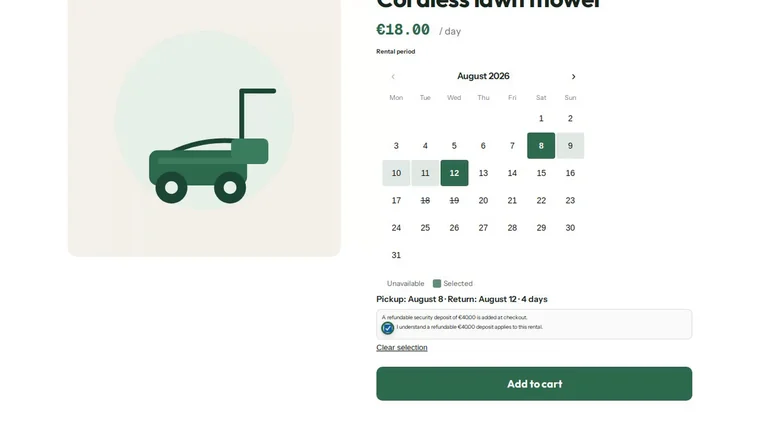
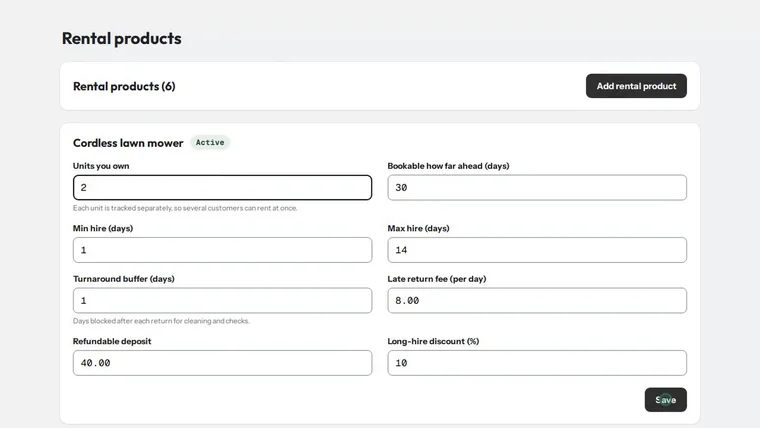
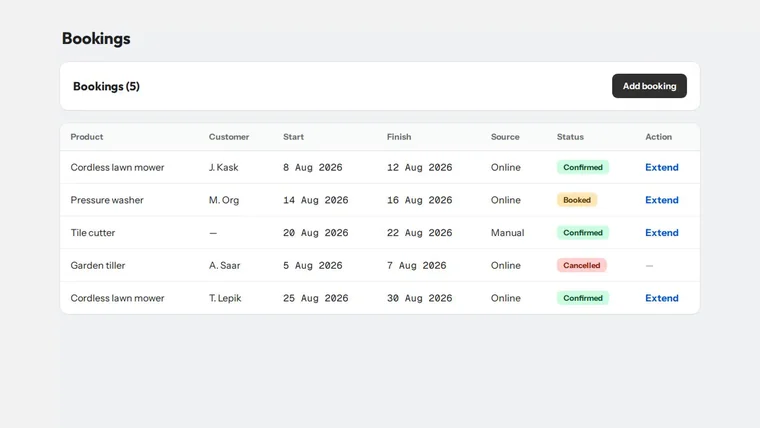
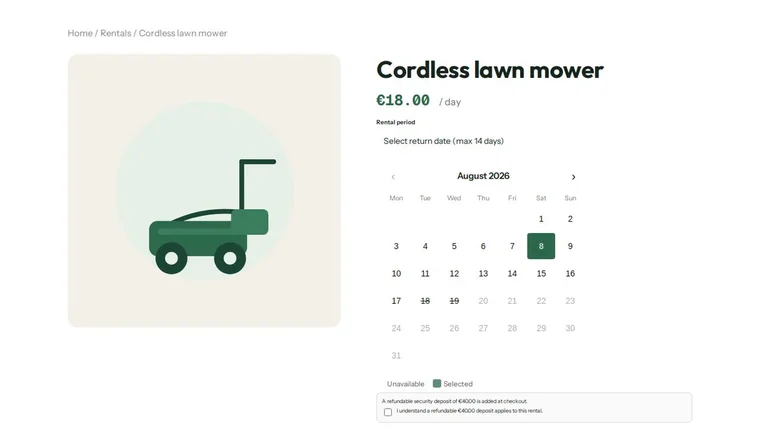
Straight from the App Store listing, storefront calendar, setup, bookings and deposits.
Built for the way rentals actually work.
A rental isn't a one-day appointment, it's an item that leaves, comes back, and needs cleaning before it goes out again. HyreKit is built for that from the ground up, so the parts most booking tools leave to you are simply handled.
Everything a rental needs, nothing it doesn't.
No double-bookings
Real-time availability, a hold on the cart during checkout, and every day of the hire reserved so an item is never promised twice.
Security deposits
Take a refundable bond at checkout and release it on return. Native, not a copy-pasted theme snippet.
Calendar sync
Subscribe your bookings in Google, Outlook or Apple Calendar. Your team sees every hire without logging in.
Flexible pricing
Charge a daily rate on any Shopify plan, the customer pays it for each day they hire. On Shopify Plus you can also layer in day-of-week or seasonal rates and automatic duration discounts.
Assets & maintenance
Track each physical unit, its service intervals and history, so gear gets serviced before it fails on a customer.
Scan it out, scan it back
The free Android Companion app turns a phone into a counter. Scan a machine's code to hand it out against the right booking; scan it again on return to log engine hours and condition. Works offline in the yard.
Every machine has a name
Two of the same chipper are no longer the same thing. Each unit carries its own serial, rental count, engine hours and service log, and a booking remembers which one went out.
Multi-unit & buffers
Hold a stock count per item and set a lead or lag window so there's time to ship, check and clean between hires.
Speaks your languages
The booking widget shows automatically in your customer's language, no setup, no copy to manage. It ships in nine major languages with an English fallback, and we add any language you need.
Manual bookings
Take a phone or in-person hire and it lands in the same calendar and availability as your online bookings.
Pickup & return built in
Confirmation emails carry the rental dates, your pickup address and hours, and a short safety note for the gear.
Three steps. No code.
Set the rule
Choose which products are rentable, how many you have, and the shortest and longest hire you'll allow.
Customers pick dates
The widget shows real availability on the product page. Booked and buffer days are out; the cart is held during checkout.
See it everywhere
The booking lands in your HyreKit calendar and the feed you subscribed to. Nothing to reconcile by hand.
Run your rental, end to end.
Everything you set lives in one app inside Shopify admin. Here's how each piece works and where to find it.
Decide what's rentable and how much of it you have.
- OpenHyreKit → Assetsand link each physical unit to its Shopify product.
- Set how many units you hold, so the same item can be hired in parallel up to your real stock.
- Choose the shortest and longest hire you'll accept.
Give yourself time to ship, check and clean between hires.
- Add a lead or lag window per product. Those days show as unavailable around every booking, so nothing goes back out before it's ready.
Set the numbers to match how you actually rent.
- Charge a daily rate on any plan, the customer pays it for each rental day.
- On Shopify Plus, vary the rate by day of week or season and reward longer hires with automatic duration discounts.
Take a refundable bond on the gear that needs one, switched on per product, with its own amount as a net value in your store currency.
- OpenHyreKit → Deposits.
- TickDepositon each product that needs a bond; leave the rest off.
- Type the amount (net, in your store currency) and pressSave deposits.
At checkout the deposit rides along as its own line next to the rental, so the customer sees exactly what is hire and what is bond. When the item comes back in good order you refund the deposit line in full; keep part of it for damage or a late return.
Deposits are part of the published HyreKit app and work on any Shopify plan.
Keep each physical unit healthy.
- Track serial, location and engine hours per unit.
- Set service intervals and log maintenance, so gear is checked before it fails on a customer. A unit in service drops out of availability on its own.
See every hire without logging in.
- OpenHyreKit → Calendarfor the in-app view, or subscribe the booking feed in Google, Outlook or Apple Calendar. Your whole team stays in sync.
Phone and walk-in hires belong in the same place.
- Add a manual booking and it shares the same calendar and availability as online orders, so it can't be double-booked.
Nothing to translate.
- The booking widget follows the language your customer is browsing in, nine languages out of the box, English as the fallback, and any language added on request.
Start free. Pay when it earns its keep.
Flat monthly price, billed through Shopify. Annual plans save two months. Every paid plan starts with a 14-day free trial.
- Date-picker & live availability
- Cart holds & no double-booking
- Blackout dates
- Order confirmation with dates
- Up to 15 rentable products
- Everything in Basic, unlimited products
- Multi-unit stock & cleaning buffers
- Longer-hire discounts
- Calendar feed & admin calendar
- Manual bookings & pickup emails
- Everything in Standard
- Refundable security deposits
- Rental extensions & late fees
- Assets & maintenance tracking
- Flexible pricing rules & priority support
Questions, answered.
How fast is support?
Under 1 hour, day or night. Every question gets a real reply from the 24/7 operator team that runs HyreKit, not an autoresponder. Write tosupport@hyrekit.io.
How do deposits work?
On Premium, HyreKit adds a refundable deposit at checkout and tracks it against the booking. You release it in full or in part when the item comes back.
I'm already on another rental app, can I switch?
Yes, and it's quick. Your past and current Shopify orders never move, so nothing is at risk there. Set up your products in HyreKit, import any in-progress bookings from a CSV, and swap the product-page widget.See the migration guide.
What happens if I change plan?
Upgrades unlock immediately. If you downgrade, nothing is deleted: existing bookings, deposits and discounts stay. The higher-tier features simply stop taking new actions.
Which Shopify plan do I need?
Core rentals, daily-rate pricing, the booking calendar, deposits and maintenance, run on every Shopify plan, including Basic. The widget installs as a theme app block on Online Store 2.0 themes. Two advanced extras use Shopify Functions and therefore need Shopify Plus: day-of-week / seasonal rate rules and automatic duration discounts.
Will it slow my store down?
The widget is small and availability is cached. HyreKit is built to stay out of the way of your storefront and your checkout.
Can I take phone bookings too?
Yes. Add a manual booking and it shares the same calendar and availability as online hires, so nothing gets double-booked.
Which languages does the widget support?
It follows the language your customer is browsing in. Estonian, English, Russian, German, French, Spanish, Italian, Dutch and Portuguese ship out of the box, with English as the fallback for anything else, and we add a language on request.
Is my data mine?
Your bookings and assets are yours. Export them any time, and they stay intact whatever plan you're on.
Where do I set deposits?
In the HyreKit app under Deposits. Switch a deposit on per product and enter the amount as a net value in your store currency. Products without it checkout as a plain hire.
How do I return a deposit?
When the gear comes back fine, refund the deposit line in full. If there's damage or a late return, keep part of it and refund the rest, it's a normal Shopify refund on that line.
Can the deposit differ per item?
Yes. Each rental product carries its own on/off switch and its own amount, so a hedge trimmer and a mini excavator can ask for very different bonds.
What does the customer see in another currency?
The deposit is shown in the same presentment currency as the rest of the cart, converted automatically, so the bond reads correctly wherever the customer is buying from.
Be one of the first rental shops on HyreKit.
HyreKit is live on the Shopify App Store. Install it, set up your rentals, and start taking bookings in minutes. Already on another rental app? Your orders stay in Shopify and your bookings import in minutes, switching is a quiet afternoon, not a project.
View on the Shopify App Store